

Changelog
What's new in Spreadu. Real updates, no fake version numbers.
September 2026
1.4.1: A little more control over your spreads
September 25, 2026
Easier photo placement
Ever looked at a spread and thought, “That photo would look better over there”? We've made it easier to try that idea and see how it looks.
Drag a photo beside another, between two photos, or below a whole group. A line shows where it will fit and which photos you're arranging around. Hold there for a moment to see the new layout before you let go.
It feels steadier, too. Small movements of your hand won't keep changing the chosen spot, and the spread stays put while you decide. Move a little further when you're ready to try somewhere else.
Bring two moments together. Try a different order. And if you preferred it before, Undo takes you back. There's more room to experiment until the spread feels right to you.
More tools within reach
We've brought more controls into the dock below your spread. Open Smart Layout, switch between Spread and Per Page, or swap the left and right pages without digging through menus. Select a photo and Move, Crop, and full-page or full-spread options are right there too.
Space at the spine
Per Page now leaves a gap at the spine by default, keeping photos on facing pages from meeting in the middle. Auto follows the spacing between your photos, or you can set the gap yourself. Each page keeps its own layout, with a little breathing room between them.
1.4.0: It's here
September 23, 2026
We've spent the past few days working flat out to get this into your hands. Spreadu 1.4.0 is here, and you can start trying it today. We redesigned the three places where an album comes together: photo upload, the editor, and client proofing.
A new editor, built around your spreads. The pages have room to breathe, with tools close when you need them and out of the way when you don't. New Version History lets you compare an earlier spread with the current one before you restore it.
Your photos, ready for what comes next. Photo Upload, Photos, and Scenes now feel like one workspace. Add a batch, keep an eye on its progress, then find the right frames and bring them into scenes without losing your place.
Proofing that makes every note count. Your clients can point to a photo, leave a note, request its removal, or choose a replacement beside the album. Clear photo numbers keep everyone talking about the same image, and clients can review their feedback before sending it.
And more than 45 improvements you won't see. We've made another round of changes to performance, responsiveness, and security, plus many smaller fixes that make everyday work in Spreadu smoother. They may not come with new buttons, but they matter every time you work on an album.
There is more to 1.4.0 than you can see today. We're turning on the remaining options one by one as they're ready. Open an album and try what's here now. If you find a bug or something gets in your way, email Tom. We want to hear about it.
1.3.4: A little closer to the editor you want
September 17, 2026
We’ve had over a hundred calls with photographers using Spreadu. You’ve shown us how you work, where you get stuck, and what you wish felt a little more natural. Thank you for being so open with us, especially about the things we still need to get right.
Those conversations are shaping the editor right now. Version 1.3.4 is another step, with improvements arriving as they’re ready while we work towards 1.4.0, aiming for the end of September. You’ll get to use them along the way.
We built Spreadu to be something you’d want to use every day, and we need your experience to get there. When you show us something that gets in your way, it helps us decide what to work on next. Being a small team means we can take what we learn from a conversation and get straight to work.
So please keep telling us. The little annoyance you almost didn’t mention, the idea you’re unsure anyone else needs, the thing you wish worked differently. We want to hear all of it.
Drop us a note. We’d love to see what you’re working on and what would make your next album easier.
Tom & Mark
1.3.3: Your feedback, in the editor
September 10, 2026
This update started with Spreadu users who took a little time to talk with us, share their screens, and show us where album design could feel better. That is contribution. Every conversation helps us build Spreadu for the people using it, and your voice and ideas count.
A special thank you to Chris at Underatreehouse Photography for the thoughtful feedback and real editing examples that helped shape this release. If something slows you down, or you have an idea you'd love to see, get in touch. We'd love to hear it.
Your photo tools, right where you need them. Right-click a photo to open the new panel, or double-click to go straight to Crop. Choose proportions with visual buttons, adjust zoom and rotation together, and apply your changes without hopping between panels. The filename stays visible, and a frame keeps the photo you're working on easy to spot.
A photo belongs on the next spread? Move it. Send it directly to another spread from the panel. No deleting it first, hunting through the photo library, or trying to remember which nearly identical frame you picked. Changed your mind? Undo brings it back.
Find the photo by name. Search the photo library by filename or number. When a client asks for the photo ending in “533”, you can look it up right in the editor.
A little proofing polish. A few quiet refinements for you and the people viewing your albums. We'll let you discover those.
Plenty you won't see. Lots of small performance improvements behind the scenes, helping the everyday work feel smoother without adding another button to learn.
1.3.2: A clearer path from photos to pages
September 8, 2026
Your dashboard, with room to breathe. Fewer repeated buttons, less clutter, and clearer next steps. Get back to your albums without the scavenger hunt.
Gather the photos. Move the story. Draw a box to select photos, add another group, and drag them into a scene or onto a spread. The same gestures now work in Photo Upload and the editor, with a thumbnail stack showing what you're carrying.
1.3.1: Opening the door to AI
September 5, 2026
You put your heart into the photos. Getting them into an album should leave you with enough evening to enjoy it. This release opens the door to AI that helps you get there.
AI Album Builder: Beta. Coming soon.
We're testing the AI Album Builder internally. It isn't available to customers yet. The beta is coming soon, and the feature will be included exclusively in the Annual plan when it launches.
A simpler dashboard, with Henry by your side
We're making your dashboard smarter and simpler, so you can spend less time finding your way and more time on your albums. After three months of conversations with you, we know much more about where Henry AI can lend a hand. He's getting a makeover and new abilities to help you work through ideas and build albums together.
A little less waiting
We've also made dozens more improvements under the hood to keep Spreadu running faster and smoother, so the little things take less time out of your day.
August 2026
1.3.0: Sixteen languages, and a second opinion on your layouts
August 24, 2026
Spreadu speaks sixteen languages now: English, Polish, German, French, Italian, Spanish, Portuguese, Dutch, Swedish, Czech, Croatian, Danish, Norwegian, Turkish, Finnish, and Slovak. Pick yours once in the editor and the whole app follows, dashboard through proofing.
Meet Shuffle
It is for the spread that is fine but not right. Hit it and four alternatives appear, every one of them computed from the photos already on that page, never pulled off a shelf. They reach past the obvious grid too, into the layered arrangements you would otherwise build by hand.
Arrow through the options and each one lands on your canvas before you commit to anything. Nothing saves until you say so, nothing gets cropped, and no photo is ever rotated. Shuffle works across the whole spread, or one page at a time.
It ships as a preview and it will keep getting sharper. If it hands you something brilliant, or something baffling, tell Tom. That is what shapes the next round.
The fixes you will actually notice
Drag and drop got a proper pass.
- Photos land where you drop them. Dropping onto an empty page could park a thumbnail in the top-left corner. Now it fills the page you aimed at.
- The first try is the one that works. Adding a photo could take a few attempts to lay out, and could quietly push out a photo that was already there.
- Per Page keeps your sizing. Working page by page on a spread you had already sized no longer snaps it back to full bleed.
- The drag preview keeps pace with your cursor instead of trailing a beat behind it.
- A panned or zoomed photo holds its crop while the layout moves around it, rather than snapping into place at the very end.
That is the short list. Since July we shipped 188 fixes, and you will notice about 75 of them. The rest were us tightening bolts you were never meant to see.
One more thing
We started a YouTube channel. A few quick tips are up already, collected in the Quick Tips playlist. If there is something you want walked through, tell Mark and we will film it.
July 2026
1.2.1: More languages, safer pages
July 21, 2026
Spreadu now speaks Spanish, Italian, German, and Polish. You can switch languages from the editor, and your choice stays with you across the app.
We also made Print Bleed Guard page-aware in Per Page mode. Each page is now checked independently, with clearer edge guidance before export, so a safe side can no longer hide an issue on the other.
Proofing is smoother too. Sharing a review link now catches invalid or duplicate client emails, gives you clearer delivery options, and makes change history and comparisons easier to follow. Comments and live updates also recover more reliably when a connection drops.
Across the rest of the app, photo uploads recover more gracefully after a connection hiccup, emails and proofing reminders are more dependable, and menus inside dialogs behave as expected. Partner Program members can also choose a username with an instant availability check.
June 2026
1.2.0: Proofing, rebuilt for real client work
June 29, 2026
This is the big one.
Client proofing has been completely redesigned around the real back-and-forth of album approval: clearer review flow, sharper visual requests, faster replies, and a calmer place to turn feedback into finished spreads.
We also shipped the new image edit bar, so photo adjustments feel closer to the canvas and easier to trust while you work.
Along the way we cleaned up a long list of editor, proofing, and reliability details. Less friction, fewer surprises, faster decisions. Spreadu 1.2.0 is a much stronger album workflow from first draft to final yes.
1.1.3: Arrange a layflat page without touching the mouse
June 22, 2026
You know the reflex. You tap an arrow key to nudge a photo on a layflat page, and nothing happens. In Per Page mode the arrow keys did nothing at all, so the only way to shape a single page was to reach for the mouse. Now the keyboard handles it, one page at a time.
Select a photo in Per Page mode, then:
- Arrow key moves that photo one step within its own page, toward the edge you pressed. The opposite arrow walks it back. The other page does not budge, and nothing ever crosses the spine.
- Shift + Arrow rearranges only the page that holds your selected photo into a fuller layout, with that photo anchored to the side you pressed. Press the same direction again to cycle through layouts.
Your photo stays selected, and each press is one clean undo, so backing out is painless. These gestures already worked across the whole spread in Spread mode. Now Per Page has the same feel, scoped to a single page, in the main Spreadu editor and in hosted lab editors.
We also fixed a preview hiccup in the same release. After a drag and drop, using Shift + Arrow could make the on-screen spread show overlapping photos until you refreshed. Your saved album and thumbnail were always correct. Now the live preview stays clean and matches what gets saved.
See the full keyboard map: Arrange your album from the keyboard.
1.1.2: Custom albums, proofing, and editor reliability
June 21, 2026
We fixed how custom album specifications are saved. When you enter a custom page size, Spreadu now builds the full double-page spread correctly, including bound-album spine width where needed, so the editor no longer treats a spread like a single page.
We also fixed a date-formatting crash that could make proofing and the editor fail right after a proofing link was created. Proofing links, expiry details, and the editor proofing drawer now render reliably across browsers and locales.
Proofing is more flexible now too: you can create additional proofing links, even after an export, so client review can keep moving.
Thanks to Maë and Michael for spotting the bugs and reporting them clearly.
1.1.1: Safer print edges, smarter albums on deck
June 16, 2026
We added Print Bleed Guard to the editor. When a photo reaches the trim area without enough bleed, Spreadu now marks the risky edge before export and explains what needs attention. Red means fix it before print. Amber means you still have some tolerance, but the edge deserves a look.
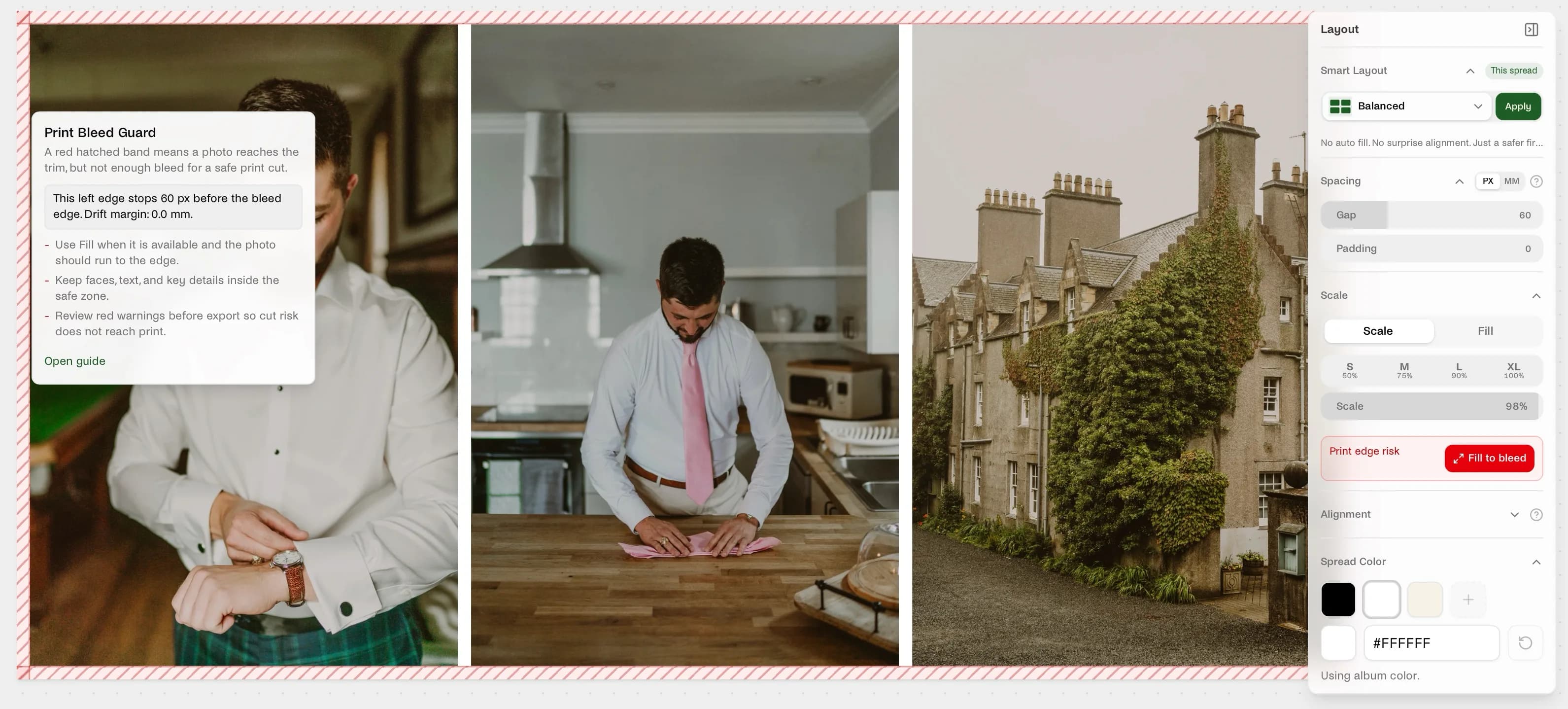
Read the guide: Print Bleed Guard.
We are also preparing the beta of our AI Album Builder. The goal is simple: help photographers move from a full shoot to a thoughtful album draft much faster, while keeping the story and the frame intact. Beta access will start rolling out soon for users on the Annual plan.
1.0.9: Bulk drops that behave
June 10, 2026
This one is for everyone who grabs a handful of photos and drops them onto a spread all at once.
What's better in 1.0.9:
- Multi-photo drops are much more dependable. Dropping a batch onto a spread that already has photos no longer scrambles the layout or leaves empty slots behind. Photos land exactly where the preview said they would.
- No accidental duplicates. If some photos in your selection are already on the spread, we quietly skip them and place only the new ones, with a small note so you know what happened.
- You can finally see what you're dragging. The drag preview now shows up for multi-photo drags too, so bulk drops feel as guided as single ones.
- Fewer "modified by another user" surprises. We fixed cases where the editor wrongly thought someone else touched your spread while you were just switching spreads or adjusting spacing. Your saves now go through quietly, the way they always should have.
- Smoother photo placement. The editor does less unnecessary recalculating when photos land on a spread, so bigger drops feel lighter.
Most of this is invisible plumbing. That's the point. You drop photos, they land, the album saves. No drama.
1.0.8: Your photo metadata finally comes through
June 8, 2026
This release makes photo uploads feel much smarter from the first drop.
Spreadu now reads and keeps the metadata photographers actually care about: capture date, camera, lens, ISO, shutter speed, aperture, focal length, orientation, aspect ratio, and star ratings when they're already in the file. That means your photos arrive with more of their real context intact instead of feeling stripped down the moment they hit the album.
It also sets us up for better sorting, filtering, and review tools across the photo workflow. Not flashy in the marketing sense. Very flashy in the "finally, this app respects my files" sense.
One important note: this release is about EXIF and metadata handling. AI photo analysis is not live yet. That's still on the roadmap and we'll call it out clearly when it ships.
1.0.7: Faster, calmer editing
June 8, 2026
This release makes the editor feel much more in sync with you. Saving is steadier, spread switching feels snappier, thumbnails catch up faster, and replacing a photo feels more confident from the first drag. A lot of behind-the-scenes work, but the result is simple: editing feels faster, calmer, and more trustworthy.
The clearest example is the new layflat alignment snap. Read the full story in Even pages, without the squint.
1.0.6: Editor reliability, proofing polish, and cleaner spreads
June 5, 2026
This release is mostly about trust.
We spent the cycle tightening the parts of Spreadu that have to feel invisible when you're deep in a real album: saving, switching spreads, reviewing proofing comments, and making quick image adjustments without second-guessing whether the app actually kept up.
What's better in 1.0.6:
- More reliable spread saving. Zoom, pan, rotate, spacing, layout, and per-page changes are now much more consistent when you move quickly between spreads.
- Spread thumbnails stay closer to reality. Filmstrip thumbnails refresh faster and do a better job reflecting the actual spread you just edited, instead of lagging behind with an older preview.
- Undo and redo feel safer during image edits. Photo edit changes now behave more predictably when you bounce between tweaking an image and stepping backward or forward through history.
- Hosted lab editor got the same save-and-preview attention. The hosted editing flow now matches the core editor more closely, especially around spread switching and spread thumbnails.
- Cleaner visual alignment on spreads. We also tightened some layout presentation details, including more balanced left/right page line-ups for image blocks.
Nothing flashy. Just a calmer, more dependable editing flow.
May 2026
Spreadu is here. The doors are open.
May 2026
We did it. Spreadu is officially out of beta, the waitlist is gone, and registration is open to every photographer who wants in. If you're reading this, you're early. Welcome.
A year ago this was a hunch. Today it's a real product with photographers shipping real albums to real clients. Thank you to everyone who tested, broke things, sent screenshots at 1 AM, and told us exactly what was missing. You built this with us.
Here's what 1.0 means, in plain language:
- Open registration. No waitlist. No invite codes. Sign up, design an album, decide for yourself.
- Real print lab specs, built in. Pick your lab, pick a product, and the canvas matches exactly what your lab will print. What you design is what gets pressed. Jump to the lab list →
- The Smart Layout Engine, all grown up. Here's the story. We took an algorithm originally built for logistics, the same class of math that assigns workers to jobs and routes packages across a city, and taught it to read photo aspect ratios. Then we pointed it at your spreads. It lays out a 20-photo spread in under 5 milliseconds, never picks from a template library, and never crops your frame to make the math easier. No auto-crop. No templates. Two rules we've held since day one. Hundreds of edge cases shipped during beta, including the gnarly ones: vertical groups, mixed aspect ratios, panoramas, the awkward portrait next to two landscapes. It just works now.
- Designing with other humans
beta. Bring your second shooter, your business partner, or your culling assistant into the same album at the same time. Watch their drags happen live, see what they have selected, feel the spreads shift as they move things around. Edits land for everyone the moment they happen, no "who saved last?" standoff and no two-people-fighting-over-the-same-photo panic. The connection self-heals when your wifi taps out, picks up exactly where you left off, and quietly catches you up on everything you missed. We're still battle-testing it with multi-designer studios. Want a seat? Tell us and we'll set you up. - Henry, your design co-pilot. Built-in AI that can see your album, your scenes, and your photos. Ask Henry to group photos into scenes, surface what you haven't placed yet, or talk through a tough album with you.
- Client proofing, in real time. Share a link, your client sees the album. They tap a photo, leave a comment, and you see it the second it lands. The bride in London can comment on Tuesday morning, the maid of honor in Sydney can chime in on Tuesday night, your reply syncs to both of them the moment you type it. No app to download, no account on their side, no "did you get my notes?" emails. Comments and your photographer feedback sync live across every device. Password protection and expiring links for the sensitive shoots.
- Print-ready, first try. No more "can you re-export with bleed?" emails from your lab. The file lands the way they want it. Plus a JPG export for proofing and socials.
- Pay how you design. Start free with one album, then pay $15 per album when you design occasionally, $35/mo for 5 albums a month, or $295/yr for unlimited (saves you $125 vs paying monthly).
About those print labs
Designing in generic dimensions and praying your lab forgives you has always been the worst part of this job. One lab wants 12x12, another wants 10x10 with 3mm bleed, another wants a specific color profile. Get it wrong, your album comes back wrong.
Spreadu now ships with real lab catalogs. Pick your lab, pick your product, design to their exact spec. The file lands the way they want it, the first time. A couple of things worth knowing:
- You order with your lab directly. Spreadu doesn't sit between you and your lab. Your relationship, your account, your pricing. We just make sure the file is right.
- Run a print lab? If you care about photographers and color the way we do, get in touch. We onboard your products, your specs, and your file requirements so every photographer designing for you gets it right the first time.
Album Crafters · Artpoint Albums (Non-US, metric) · Artpoint Albums US · Atkins Lab · Couture Book · Crystal Albums · Dekora Album · Dreambooks · Dutch Ink Albums · Extremaalbum · Floricolor (Europe) · Floricolor (USA) · Folio Albums · Fotofan · Fravero · GicléeArt.it · Graphistudio (Non-US, metric) · Graphistudio US · Henley Albums · Jiggy Albums · Jorgensen Albums · Kitoli · Konpoli Europe · Kvalitní Fotky · Laser Link · Lifethreads Albums · Loxley Color · Madera Books · Miller's Lab · Musea Lab · nPhoto · Oodio · Pafe Alben · Pixmig · Queensberry · RedTree Albums · Serendipity Albums · Sim Imaging · The Album Master · UAF Photo Lab · Wooden Banana · Yellow Rebel
Your favorite lab not on the list? Tell us who they are and we'll reach out.
One more thing
This is 1.0, not "we're done." It's the version we're proud to put our name on and ask you to put yours on too. The roadmap is full and we ship every week. Keep telling us what's missing.
If you've been holding out for the right moment, this is it. Full wedding album in 20 minutes. Zero crops. Layouts computed in under 5 milliseconds, your frame never touched, your Saturday nights handed back to you. Your first album can start free, and your photos already deserve this.
Your clients are about to send you the "WOW, I'm crying" reply instead of a spreadsheet of revision notes. We'll handle the boring parts. You handle the art.
Design Your First Album Free → · See what's coming next →
March 2026
Closed Beta Launch
March 2026
Spreadu is officially in closed beta. We're inviting photographers in waves and building alongside them. Here's what's in the box:
- Smart Layout Engine. Drop photos onto a spread and get a gorgeous layout in milliseconds. No cropping. Your photos, your aspect ratios, respected.
- Spread Editor. Visual canvas with drag-and-drop photo placement, auto-layout, and manual adjustments. Zoom, pan, rotate, resize. All the controls you need.
- Scenes. Organize your photos into collections. Ceremony, portraits, reception. Whatever makes sense for the shoot.
- Client Proofing. Share a link. Your client views and comments on the album. No account needed on their end. Password protection and expiring links for sensitive work.
- Export Pipeline. Print-ready PDF/X-4 with trim marks, bleed, and ICC profiles. JPG export for proofing and social. Parallel rendering for fast output.
- Photo Grid. Lasso select, bulk operations, and virtualized scrolling. 2,000 photos without lag.
- Real-Time Collaboration. Multiple people in the same album at once. Live cursors, instant sync, no conflicts.
- Dark Mode. Because 11 PM album sessions shouldn't blind you.
This is just the beginning. Your feedback shapes what comes next.